AUSTIN FERNANDEZ
Gane Designer


BLACKFLAME TEMPLE
ELDEN RING: LEVEL BLOCKOUT

WALKTHROUGH
OVERVIEW
This level was created to capture the feeling of an Elden Ring legacy dungeon. A linear, more compact experience reminiscent of the Dark Souls design framework, but with the addition of jumping as a traversal mechanic.
Planned in Miro & Figma
Designed in UE5
~10 minutes of gameplay
DESIGN GOALS
-
Capture the atmosphere and experience of an Elden Ring legacy dungeon
-
Use in-engine modeling tools to establish a visually striking scene
-
Evoke a dark and imposing tone without use of art assets
-
Replicate the feel of Elden Ring by tuning an existing gameplay system
PROCESS


Top-down Map

Starting Area


I began with a proxy mesh of the basic shapes I had in mind for the level to gauge scale.
Initially, the walkway was made of the same vertex sculpted rock walls as the ceiling, but was later changed to a landscape.
The player begins on a rocky walkway down to the temple.
This frames the majority of the level, and also places them in the path of an NPC who clues them in on the foes they'll face later on.
Landing


The initial pathing through this section had several ways to progress through it, but they didn't serve enough of a purpose, and were reduced over time.
I also added more negative and implied space.
This landing area contains some environmental storytelling to convey to the player that the temple is currently being rebuilt.
Carts of building materials are being brought through the main gate, and some scaffolding can be seen as well.
Inside the Gate


I found the room to be too narrow for my purposes, so I pushed the back wall further out.
There was also a version of this space with a major elevation change cutting the room in half longways, but I found it awkward, and leveled out the floor after some consideration.
Within the gate, enemies can be seen moving around supplies and building materials.
Player's progress by finding a lever for the gate, with a side room and shortcut leading back to the landing behind it.
Courtyard

The courtyard hasn't changed too much since the initial proxies, but some alterations were made to better highlight the entrance to the Crypt, as well as guide the player through the space.
This space is more open and shows the player all three remaining areas.


Living Quarters

This section began as being more interconnected, with each building being accessible from both the ground floor and the second floor, as well as a path jumping along the rooftops.
I cut these numerous paths down to one critical, and one optional.

I decided to keep the space closed off to obscure the combat space ahead.
The bottom section was also removed so as to reduce the redundancy in navigating the space.
Cathedral

The pathway from the balcony to the cathedral interior was primarily dominated by the staircase.
I wanted to place the player in the direction of the critical path, whilst reducing the amount of space the stairs took up, for I shifted to a spiral staircase.
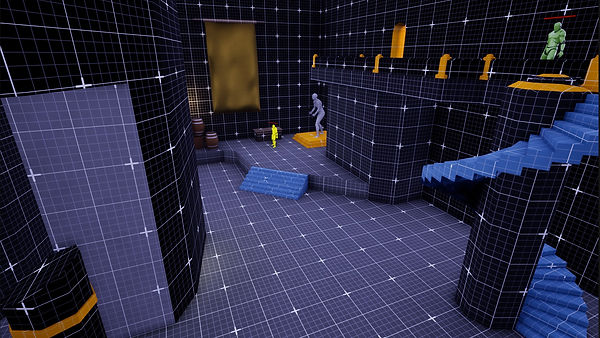
I aimed to establish this space as a buffer zone between gameplay sections, so I gave the player the option to unlock the front gate shortcut and retreat back to the site of grace.
Crypt


The crypt is the location of the boss room, and where the level reaches its end.
I designed it to be interacted with immediately, and then returned to via the Cathedral shortcut once the player has the key at the top of the Cathedral. I found that the crypt entrance was too unassuming and appeared confusing rather than interesting.
To better communicate this intention, I pushed the doorway back, and down a set of stairs, so straight from the site of grace players could see this as a viable path.
I also created an archway around the entrance, raised in slightly on a pedestal, and placed braziers around it to light it clearly.
DEV TOOLS / PLANNING
Miro
Asset Creation

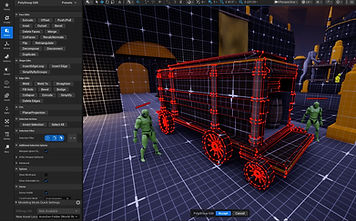

All of the geometry was created in engine, using the modeling toolkit native to Unreal.
My basic process was to block out geometry using a reference image of some kind, add edge loops and slight extrusions for detail, and then bevel the edges (or faces) to maintain a consistent visual theme.
I used split and merge to separate specific parts of the mesh in order to assign different materials to that section, before merging the pieces back together into either a static or dynamic mesh, depending on the use case of the asset.


Some assets also made use of vertex sculpting, which is a tool I used for the first time on this project. The banners and rock walls are vertex sculpted. I started with cubes, scaled them into shape, and then latticed them with edge loops to increase the amount of vertices.
The rock walls were made by pulling and pushing the vertices away from each other, whilst the cloth-like assets were made by smoothing out small changes in elevation between sections of the mesh.
Blueprints
Locked Gate
Gate Lever
Most of the blueprints for this gameplay system were created by a friend of mine in the form of an asset pack. I fine tuned a few values in the player controller, and retrofitted some of the UI scripts to better suit my specific needs, but the bulk of the code was theirs.
The locked door and lever blueprints however, were entirely my own creations.